
Agentic IAM: Secure Identity for AI Agents
Updated: Sep 1
Overview
As organizations scale their generative AI capabilities, they are transitioning from static, conversational chatbots to fully autonomous Agentic AI systems. Unlike traditional software or basic retrieval-augmented generation (RAG) interfaces, AI agents possess active capabilities: they can reason, plan, compose complex multi-step workflows, and invoke enterprise APIs or databases to execute actions at machine speed.
However, this transition introduces a fundamentally different risk profile. If an autonomous agent's identity is overprivileged, or if its operational boundaries are undefined, it can be manipulated via prompt injection to run unauthorized actions, bypass organizational silos, or cause cascading data corruption.
To deploy agentic AI safely, organizations must implement a robust Identity Control Plane that secures both human operators and autonomous non-human workloads. This blog post outlines a battle-tested architecture for managing agentic identities using Microsoft Entra ID and native Azure security services, ensuring a zero-trust posture at every step of execution.
1. The Azure Agentic Identity & Access Management (IAM) Framework
Securing agentic workflows requires strict, decoupled boundaries between session initiation, the orchestration control plane, tool execution, and the underlying data layer. Rather than letting agents directly connect to backend resources, every action must pass through a standardized, audited security pipeline.
The diagram below outlines this secure control plane:
Entra ID Agent Authentication Flow (AuthFlow)
To secure autonomous workloads without introducing static credentials or treating non-human entities as human users, Microsoft Entra ID introduces Agent IDs and the Agent Identity Blueprint framework. This model provides centralized governance, lifecycle controls, and tenant-level traceability tailored specifically for AI agents.
The Blueprint & Parent-Child Architecture
In this architecture, runtime agent instances do not possess their own passwords or certificates. Instead, they rely entirely on a parent template object called the Agent Identity Blueprint.
The hierarchy operates as follows:
Agent Identity Blueprint (Definition Layer): The parent template object that stores authentication configurations and credentials (certificates, secrets, or Federated Identity Credentials). It establishes the trust boundary and defines owners (Azure/AI Engineers) and sponsors.
Agent Identity Blueprint Principal (Tenant Security Layer): Automatically created inside Microsoft Entra ID when a blueprint is registered. It represents the blueprint within the tenant, participates in token acquisition, and appears directly in audit logs.
Agent Identities (Runtime Instances): The individual runtime agent instances created from the parent blueprint.
This parent-child relationship organizes multiple domain-specific agents under a unified, policy-enforced blueprint:
Traditional Service Principals vs. Entra Agent IDs
AI agents require a different level of tracking and lifecycle management than traditional applications:
Traditional Service Principals: Designed for deterministic, static applications. They lack AI-specific governance controls, human sponsorship models, lifecycle management, and agent-aware auditing.
Regular User Accounts: Designed for human sign-ins. Using regular accounts for AI agents violates Zero Trust principles and breaks conditional access policies and identity protection controls.
Entra Agent IDs: Provide a dedicated, governable, non-human security identity that keeps agents auditable and prevents credential exposure.
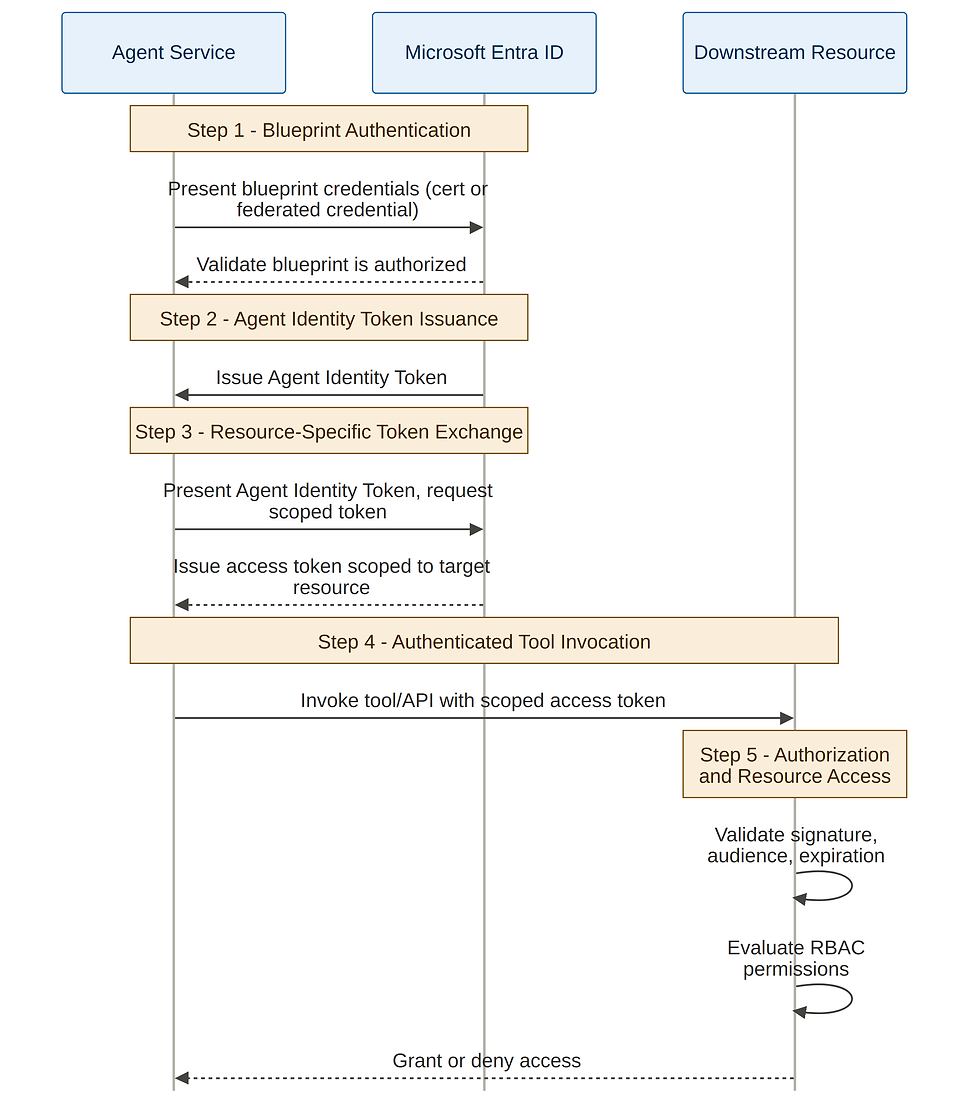
OAuth 2.0 Agent Authentication Flow (Runtime Exchange)
When an agent needs to perform an action (such as accessing Azure Storage or invoking a downstream tool), the authentication sequence executes dynamically across five steps:
Blueprint Authentication: The Agent Service presents the Blueprint Credentials (stored as a certificate or federated credentials in the parent blueprint) to Microsoft Entra ID. This validates that the runtime service is authorized to act on behalf of the blueprint.
Agent Identity Token Issuance: Microsoft Entra ID validates the blueprint and issues an Agent Identity Token representing the specific agent performing the action. This distinguishes the agent as an independent security actor from human users or traditional service principals.
Resource-Specific Token Exchange: The Agent Service presents the Agent Identity Token back to Entra ID and requests a new access token scoped specifically to the target downstream resource (e.g., https://storage.azure.com or https://vault.azure.net).
Authenticated Tool Invocation: The Agent Service attaches the scoped access token and invokes the target tool, MCP server, or downstream API.
Authorization & Resource Access: The downstream service validates the token's signature, audience, and expiration, and evaluates RBAC permissions to grant or deny access.
Real-World Example: Invoice Processing Agent
Consider a scenario where you deploy an AI agent called the Invoice Processing Agent to automate invoice management:
Phase 1: Registration: The developer registers a parent blueprint named Finance-Automation-Blueprint. This blueprint defines the Azure/AI Engineer as the technical owner, stores the root certificates in Key Vault, and defines the required permissions.
Phase 2: Principal Generation: Entra ID automatically generates the Finance-Automation-Blueprint Principal at the tenant level for token tracking.
Phase 3: Deployment: Multiple instances (such as Invoice Processing Agent 1 and Invoice Processing Agent 2) are instantiated using the blueprint.
Phase 4: Runtime Execution: When an agent runs, it authenticates via the blueprint credentials, obtains its dedicated Invoice Processing Agent token, exchanges it for a token scoped strictly to Azure Data Lake Storage (ADLS Gen2), and safely reads incoming invoice PDFs without any static passwords.
2. User Delegation vs. Entra Agent Identities
A key architectural design choice is determining the authentication pattern for the agent. Depending on the scenario, the agent must run under either User Delegation (Human-Initiated) or a Dedicated Entra Agent Workload Identity (System-Initiated).
Security Dimension | User Delegation (Human-Initiated) | Entra Agent Workload Identities (System-Initiated) |
Primary Trigger | A human workforce user initiates a task via Microsoft Teams, a custom portal, or a chat API. | Automated event triggers, scheduled jobs, background reconciliations, or autonomous multi-agent pipelines. |
Identity Protocol | OpenID Connect (OIDC) and OAuth 2.0 delegated authorization. | Entra Workload Identity utilizing OAuth 2.0 Client Credentials or Federated Credentials. |
Access Rights | Delegated Access: The agent operates on behalf of the user, inheriting their identity token and access constraints. | Application Access: The agent operates with its own distinct, non-human security context. |
Target Azure Service | Microsoft Entra ID App Registrations with user delegated permissions. | User-Assigned Managed Identities or Service Principal Names (SPNs). |
Autonomy Level | Typically Level 1 (Read-Only) or Level 2 (Assisted Action, requiring human-in-the-loop sign-off). | Supports Level 3 (Supervised Autonomy) and Level 4 (Full Autonomy) for automated workflows. |
Risk Profile | Low-to-Medium. The agent's blast radius is strictly capped by what the logged-in human user is permitted to do. | High. Since no human is present, compromised credentials or a looping agent could lead to rapid data exfiltration or system damage. |
How to Assign Least-Privilege RBAC to Agent Identities
To prevent high-risk behaviors such as Overprivileged Agent Identities (where a compromised or manipulated agent is used to move laterally across enterprise systems), organizations must implement a multi-tiered, role-based security model.
By translating enterprise identity requirements to Azure Entra ID and Azure RBAC strategies, we map specialized human personas to synchronized enterprise groups, and non-human agents to dedicated Azure Managed Identities.
Mapping Personas and Security Groups to Azure RBAC
To maintain a secure, separation-of-duties model, all users and developers are placed into Entra ID security groups, which are then mapped to specific Azure RBAC roles:
Human Persona | Microsoft Entra Group | Azure RBAC / Custom Role Mapping | Key Responsibilities | |
AI Platform Administrator | ent-agent-admins | Custom Role: Agent Registry Admin<br>Custom Role: Azure AI Content Safety Admin<br>User Access Administrator on Resource Group level | Full control over the Agent Registry to register agents and tool definitions. Manages content safety policies, prompt shields, and configures IAM role bindings. | |
AI Agent Developer | ent-agent-developers | Custom Role: Azure AI Data Agent Lifecycle Owner<br>Custom Role: Agent Registry Editor<br>Azure Machine Learning Workspace User<br>Managed Identity Operator (Applied at individual identity resource level) | Develops, deploys, and manages standalone agent skills and workflows without administrative rights. Impersonates authorized domain-specific identities during deployment. | |
Business User | ent-agent-users | Custom Role: Agent Registry Viewer | Read-only access to discover available agents, endpoints, and tool definitions in the corporate registry. | |
Data Platform Consumer | ent-data-users | Storage Blob Data Reader (for Azure Data Lake ADLS Gen2)<br>Azure SQL / Cosmos DB Reader | Provides read-only querying access to approved data lake datasets and SQL tables used by agents. | |
Power BI Consumer | ent-powerBI-users | Power BI Viewer on workspaces | Grants read access to Power BI reports, dashboard telemetry, and semantic business models. | |
Operations Support | ent-azure-Ops | Monitoring Reader<br>Log Analytics Reader | Monitors the runtime health of the platform, inspects system metrics, and accesses operational error logs. |
Non-Human Workload Identities for Domain Agents
Just as humans are restricted, autonomous agents must use dedicated User-Assigned Managed Identities to access target resources:
Managed Identity Name | Business Domain | Azure RBAC & Scoped Permissions | Core Purpose |
id-agent-finance | Finance | Storage Blob Data Reader on Finance ADLS Gen2 container<br>Power BI Viewer on Finance workspace | Executing read-only analytics, financial reporting, and budget validation. |
id-agent-hr | Human Resources | Storage Blob Data Reader on HR ADLS Gen2 container<br>Power BI Viewer on HR workspace | Running secure, compliant workforce analytics and employee metrics. |
id-agent-sales | Sales | Storage Blob Data Reader on Sales ADLS Gen2 container<br>Power BI Viewer on Sales workspace | Analysing revenue pipeline, active deals, and customer telemetry. |
id-agent-operations | Operations | Storage Blob Data Reader on Ops ADLS Gen2 container<br>Power BI Viewer on Ops workspace | Processing logistics, tracking shipments, and conducting fleet optimization. |

Just-in-Time (JIT) Scoped Tokens for Write Access
When agents are permitted to take write actions (such as updating tickets in Jira or changing database records), static, always-on write permissions must be blocked:
Token Issuance: The Policy Engine issues a time-bound, Just-in-Time (JIT) scoped token linked to the agent's Managed Identity.
Strict TTL: These tokens are valid only for the duration of the specific workflow execution (with a very short Time-To-Live) and automatically expire and revoke once the task is finished.
Write Limitations: All writes must be restricted to low-risk, fully reversible operations, routed strictly through the Tool Proxy.
4. How to Audit and Contain Agent Identities
Because AI agents can interact with systems at machine speed, reactive, "day-after" log reviews are entirely inadequate. Organizations require real-time auditing, behavior-drift detection, and immediate containment capabilities to mitigate threats.
Constructing an Immutable Audit Trail
Every transaction in the agentic control plane must generate a rich, contextual telemetry log sent directly to an Azure Log Analytics workspace. The audit log must capture:
The Origin (User Context): The corporate identity of the human user who triggered the session, along with their Entra session IDs, source IP, and device context.
The Reasoning (Model Context): The exact prompt input, system prompts, data injected via RAG, and the model's internal reasoning steps.
The Action (Tool Context): The specific API endpoint called, the parameters passed, and the payload returned through the Tool Proxy.
The Authorization (Policy Context): The exact RBAC check made by the Policy Engine, along with any Human-in-the-Loop (HITL) approval records obtained via Teams or portals.
Telemetry Errors: Full logging of exceptions, blocked actions, content moderation violations, and API response codes.
Conclusion
Securing Agentic AI requires shifting away from old, "always-on" service accounts and adopting dynamic, highly audited, and policy-gated identities. By integrating user delegation for human-facing copilots, registering autonomous background agents with dedicated Entra Workload Identities, enforcing least-privilege Azure RBAC at the resource level, and continuously monitoring for behavioral drift via Microsoft Sentinel, organizations can safely scale AI automation.
Building these identity controls is the core foundation that ensures every AI workload remains secure, governed, and operationally ready as your enterprise scales into the future of autonomous systems.

Comments